CS2 Premier Rating Explained

You win a Premier match, check your rating, and notice that the increase barely covers yesterday’s loss. Your teammate gained a different amount. What happened?
CS2 Premier Rating gives you a visible number to follow, but the game doesn’t explain every calculation behind it. The useful parts are easier to read. Your rating has a color, each match shows potential gains and losses, and placements determine when your number appears. Here’s how to make sense of all of that before your next queue.
What Is Premier Rating in CS2?
Premier Rating, officially called CS Rating, is the numerical rating you earn in Counter-Strike 2’s Premier mode. It follows your results across the Premier map pool, so you have one number rather than a separate rating for every map.
You’ll need Prime Status and profile level 10 to access Premier. Profile level comes from XP. It isn’t your competitive rank, even though both appear on your account.
Competitive matchmaking uses the familiar skill groups, from Silver I to Global Elite, assigned separately for each map. Wingman has another independent ladder. Our guide to CS2 Wingman ranks explains that system if you mostly queue with one friend.
What Do the Rating Colors Mean?
Your rating changes color at intervals of 5,000 points. The bands look familiar if you’ve spent time comparing CS2 item rarities, though they describe your position on the Premier ladder here.
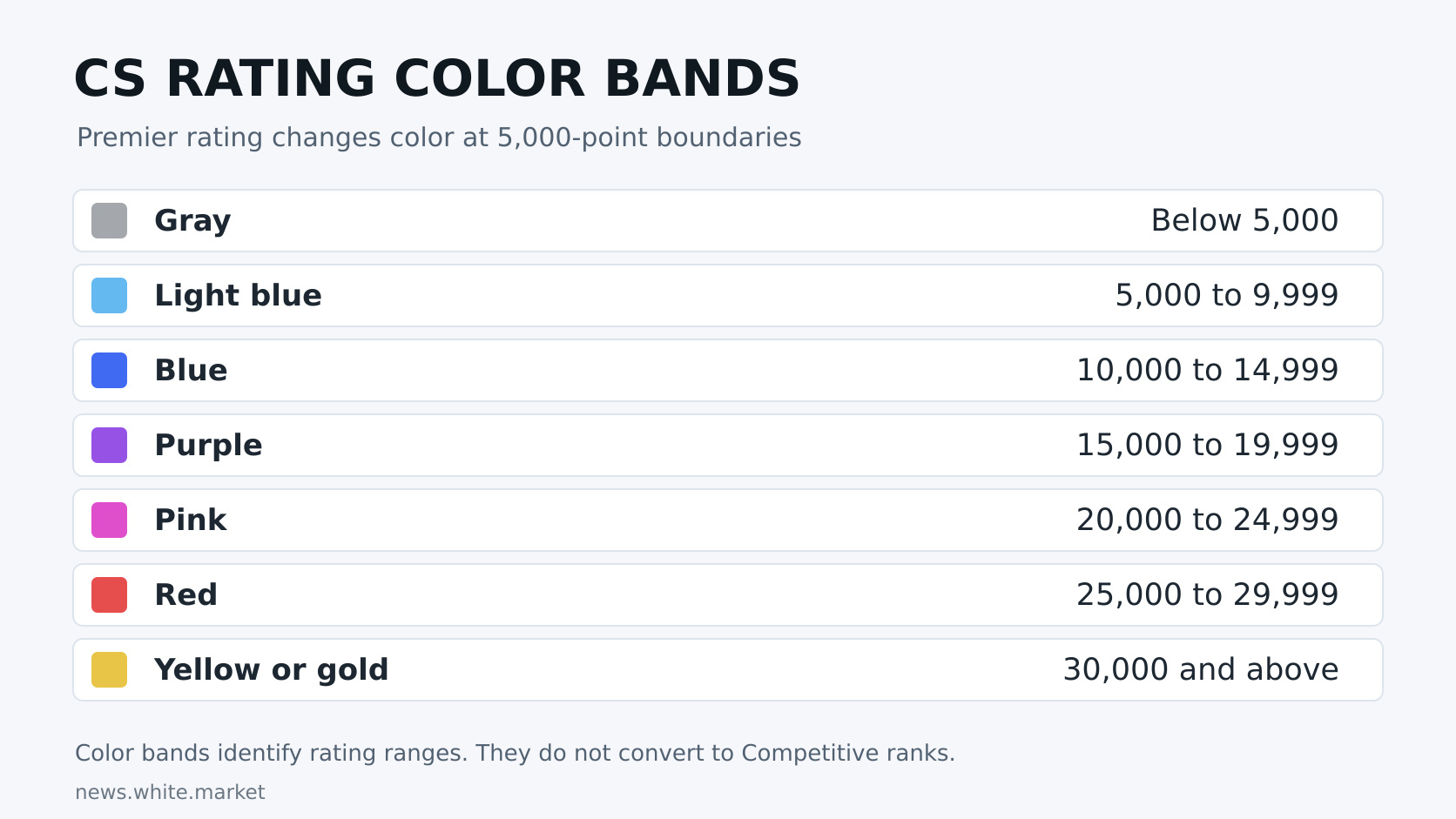
For example, 14,800 is blue and 15,200 is purple. The color makes a rating range easy to recognize, but it doesn’t certify a particular skill level in another mode. There isn’t an official conversion that makes every 15,000-rated player a Legendary Eagle or every red-rated player a Global Elite.
How Premier Rating Gains and Losses Work
Once you’re rated, the game displays the points available for a win and the points at risk for a loss before the match gets underway. Those values can differ. Check both.
Suppose you start at 12,400 and see +300 for a win or -150 for a loss. Winning would take you to 12,700. Losing would leave you at 12,250. These are example values, not a standard payout for that rating.
Your next match may show different numbers. Players often report changing gains and losses during streaks, but Valve hasn’t published a complete formula that lets you calculate your next adjustment from your recent results. Treat claims about exact streak multipliers cautiously.
The same goes for kills. A 30-kill scoreboard doesn’t come with a published Premier bonus, and topping the scoreboard won’t turn a defeat into a rating gain. Your performance helps your team win rounds. The displayed win and loss values tell you what that match can do to your rating.
Why a Win Can Give You Very Few Points
Color boundaries have promotion and relegation matches. Valve set these at every 5,000 points, which matters when you’re close to entering another band.
You might reach 14,999 and need a promotion win to move into purple. The match that brings you to the boundary can award fewer points than an ordinary win. That small increase doesn’t mean the game ignored your performance.
Read the match label alongside the number. Advice claiming that promotion matches happen at every 1,000 points comes from an older version of the system.
Placement Matches and Seasonal Resets
You need 10 Premier wins to receive your first visible rating. That’s wins, not simply 10 completed matches. Competitive victories don’t count toward your Premier placement requirement.
If you win five of your first 10 games, you’re still working through placements. The client shows how many more wins you need, so you don’t have to keep a separate tally.
Don’t expect a guaranteed starting rating from a particular placement record. Valve doesn’t publish a table saying that 10 wins with two losses always gives you one number, while 10 wins with six losses gives you another. Concentrate on playing rounds well rather than chasing a supposed placement shortcut.
What Happens When a New Season Starts?
Valve can recalibrate CS Rating between seasons and ask players to establish their visible number again. Previous results can still matter. When Season Two launched, Valve explicitly based recalibration on Season One performance and required 10 wins to reveal the new rating.
That example explains why a reset doesn’t necessarily put every player at the same starting point. Your new number can also differ from the one you finished with. Check the current season’s announcement and the counter in your Premier menu for the applicable requirements.
Season Five began on July 8, 2026. Season changes can bring map updates too, so prepare for the current pool instead of assuming the maps you practiced last season will all remain available.
Your season medal records a different kind of progress. Under Valve’s published medal rules, its color reflects your highest rating during the season, while its bars reflect wins. A medal from a previous season therefore doesn’t tell you someone’s current rating.
CS2 Ranks vs. Other Shooters
Switching games can make a familiar rank name misleading. Gold in a hero shooter and a gold Premier rating belong to different ladders, with different scoring rules.
| Game | How ranked progress is shown |
|---|---|
| CS2 Premier | One CS Rating number with color bands. Match outcomes change the rating. |
| VALORANT | Named ranks with Rank Rating (RR). Hidden MMR influences gains and losses. |
| Marvel Rivals | Named ranks and ranked points, with divisions through much of the ladder. |
| Apex Legends | Ranked tiers and Ranked Points (RP). Placement and eliminations contribute to scoring. |
Apex is a useful contrast. Finishing high in a battle royale affects the points you earn, while Premier centers its visible adjustment on winning or losing the match. There isn’t a reliable numerical conversion between the two.
These differences also matter when comparing paid progression services. LevelUpper offers boosting for Marvel Rivals and Deadlock. Its catalog also includes Apex Legends, Marathon and other games, with services built around each title’s progression system.
For your own Premier climb, start with the information the client gives you. Watch the match’s gain and loss values, check whether you’re at a color boundary, and use the placement counter when your rating is hidden. You’ll have a clearer picture of your progress than any borrowed rank label can provide.
Tags
Articles by this author