dev1ce CS2 Settings: Crosshair, Sensitivity, Viewmodel, Video Settings and Gear

Explore dev1ce CS2 settings, including his sensitivity, crosshair, viewmodel, video configuration, monitor setup, gaming gear, and current 100 Thieves roster. This guide breaks down the setup behind one of Counter-Strike’s most consistent AWPers and explains how his configuration supports precision, visibility, and calm decision-making in CS2.
Nicolai “dev1ce” Reedtz is one of the most respected AWPers in Counter-Strike history. His setup has always attracted attention because it reflects the same qualities that define his playstyle: control, consistency, clean positioning, and calm decision-making under pressure.
This guide breaks down dev1ce CS2 settings, including mouse sensitivity, crosshair preferences, viewmodel, radar, video settings, monitor configuration, hardware, and current 100 Thieves teammates. Since professional players often adjust small details between events, practice sessions, and patches, the values below should be treated as a current public snapshot rather than a permanent configuration. Where exact values differ between public databases, the article notes the source-dependent nature of the information.
Who Is dev1ce CS2?
Nicolai “dev1ce” Reedtz is a Danish professional Counter-Strike 2 player currently playing for 100 Thieves as an AWPer. In the device CS2 era, he remains one of the most experienced names in the game, bringing years of elite competition, championship experience, and tactical discipline to his team.
Before joining the 100 Thieves team, dev1ce built his legacy across the CS:GO era, most famously with Astralis. He became known for his reliable AWPing, smart rotations, low-risk positioning, and ability to win important rounds without unnecessary aggression. Unlike many highlight-heavy snipers, dev1ce’s strength has always been repeatability: he wins by being prepared, reading the round correctly, and taking percentage-based duels.
Player Information
| Category | Information |
|---|---|
| Real Name | Nicolai Reedtz |
| Nickname | dev1ce / device |
| Nationality | Denmark |
| Date of Birth | September 8, 1995 |
| Age | 30 |
| Current Team | 100 Thieves |
| Role | AWPer |
| Game | Counter-Strike 2 |
| Notable Legacy | Four-time Major winner, two-time Major MVP |
As of June 2026, dev1ce is part of the 100 Thieves CS2 roster. His presence gives the team an elite AWP foundation and a strong veteran voice in high-pressure situations.
dev1ce Crosshair and Aim Settings
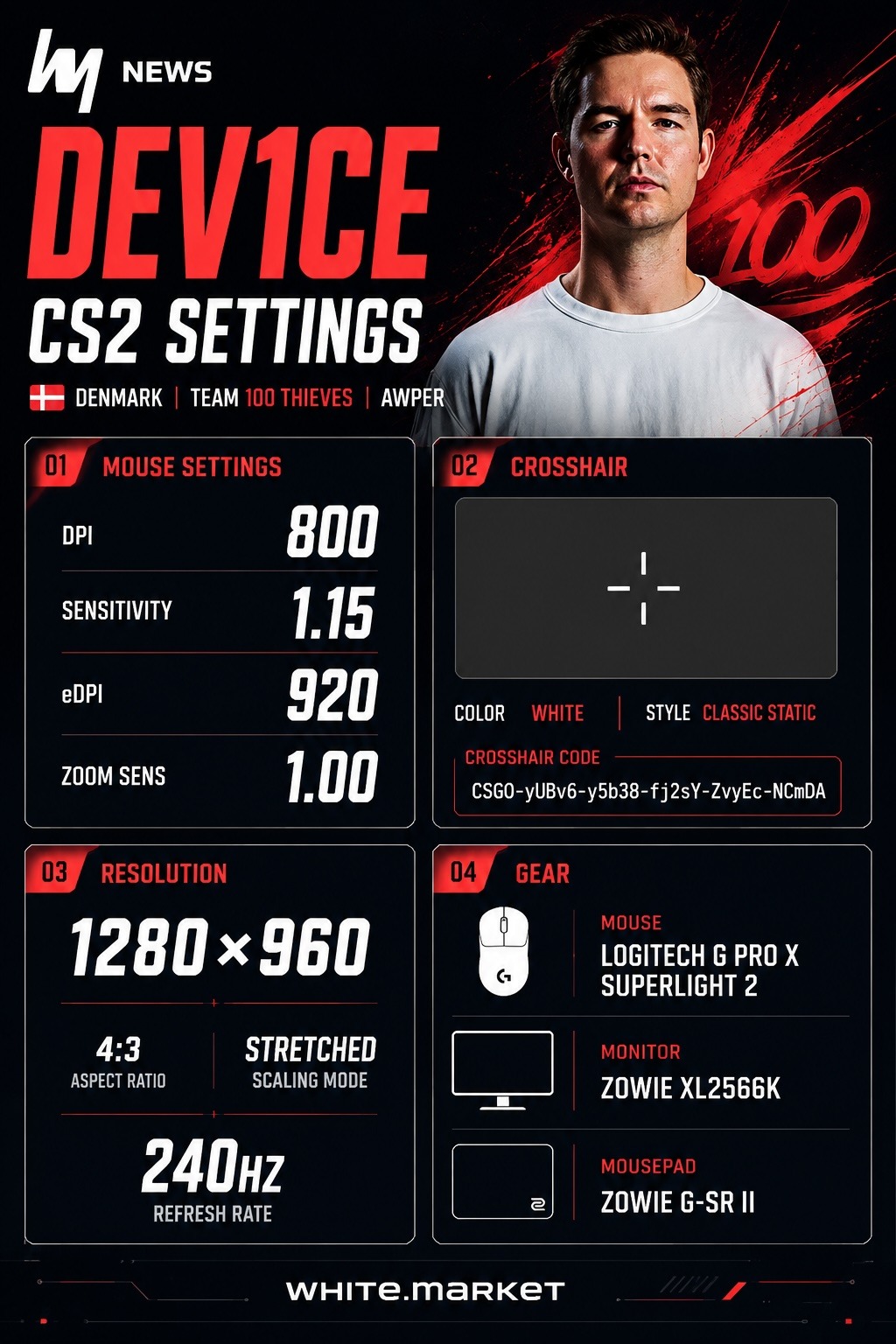
The current dev1ce settings are built around precision rather than extreme speed. His aim setup supports controlled AWP flicks, stable crosshair placement, and reliable rifle mechanics. According to ProSettings, his main mouse configuration uses 800 DPI and 1.15 in-game sensitivity, though some other public databases list slightly different values.
Mouse Settings
| Setting | Value |
|---|---|
| DPI | 800 |
| Sensitivity | 1.15 |
| eDPI | 920 |
| Zoom Sensitivity | 1.00 |
| Polling Rate | 1000 Hz |
| Windows Sensitivity | 6 |
| Main Source Note | Values based on ProSettings public listing |
This sensitivity profile gives dev1ce enough speed to react with the AWP while still preserving fine control for small corrections. His 1.00 zoom sensitivity is especially important for scoped consistency, as it keeps AWP movement predictable.
Crosshair Code
CSGO-yUBv6-y5b38-fj2sY-ZvyEc-NCmDA
Public dev1ce crosshair codes may differ between settings databases, demos, and match periods. For that reason, this code should be treated as a current public reference, not a guaranteed permanent crosshair.
Crosshair Settings
| Setting | Value |
|---|---|
| Style | Classic Static |
| Follow Recoil | No |
| Center Dot | No |
| Length | 1 |
| Thickness | 1 |
| Gap | -4 |
| Outline | No |
| Color | Custom |
| Alpha | 255 |
| T Style | No |
The dev1ce crosshair is compact and minimal. It does not take much space on the screen, which helps preserve target visibility. This fits his AWPing style well: dev1ce relies on positioning, timing, and first-bullet accuracy rather than visual clutter or large crosshair guides.
For players copying dev1ce settings, the most important lesson is not only the exact crosshair code. It is the idea behind it: a small, stable crosshair that supports precise aiming and does not distract during fast duels.
dev1ce CS2 Settings and Viewmodel
The visual side of dev1ce CS2 settings follows a familiar professional pattern: 4:3 stretched resolution, fullscreen mode, and graphics values focused on clarity and stable performance. His setup is designed to make enemy models easier to read while keeping the game responsive.
Resolution and Display
| Setting | Value |
|---|---|
| Resolution | 1280×960 |
| Aspect Ratio | 4:3 |
| Scaling Mode | Stretched |
| Display Mode | Fullscreen |
| Brightness | 100% |
| Maximum FPS In Game | 960 |
The 1280×960 stretched resolution is common among CS2 professionals. It makes player models appear wider on screen, which can help with tracking movement, holding angles, and reacting to shoulder peeks. For an AWPer like dev1ce, this setup supports cleaner reads in narrow duels.
dev1ce Viewmodel
| Setting | Value |
|---|---|
| FOV | 68 |
| Offset X | 2.5 |
| Offset Y | 0 |
| Offset Z | -1.5 |
| Presetpos | 2 |
| Bob | False |
The dev1ce viewmodel is practical and unobtrusive. It keeps the weapon model positioned away from the most important parts of the screen, allowing better visibility when holding tight angles or clearing corners.
HUD and Radar Settings
| Setting | Value |
|---|---|
| HUD Scale | 1 |
| HUD Color | Team Color |
| Radar Centers Player | Yes |
| Radar Rotates | Yes |
| Toggle Shape With Scoreboard | No |
| Radar HUD Size | 1.1 |
| Radar Map Zoom | 0.5 |
His radar setup gives quick access to map information without making the radar too large or distracting. This matters for dev1ce because his impact often comes from rotations, timing, and reading where the next duel will happen.
Video Settings
| Setting | Value |
|---|---|
| Boost Player Contrast | Enabled |
| V-Sync | Disabled |
| NVIDIA Reflex Low Latency | Disabled |
| NVIDIA G-Sync | Disabled |
| MSAA | 2x MSAA |
| Global Shadow Quality | High |
| Dynamic Shadows | All |
| Model / Texture Detail | Low |
| Texture Filtering | Anisotropic 16x |
| Shader Detail | Low |
| Particle Detail | Low |
| Ambient Occlusion | Medium |
| High Dynamic Range | Quality |
| FidelityFX Super Resolution | Disabled / Highest Quality |
Some public databases list different values for brightness, MSAA, and texture filtering, so these settings should be viewed as ProSettings-based values rather than absolute constants. Still, the overall pattern is clear: dev1ce uses a competitive setup that balances visibility, motion clarity, and performance.
Launch Options
-console -novid +exec myconfig.cfg
These launch options enable the console, skip the intro video, and load a personal config file automatically.
dev1ce Mouse and Gaming Gear
The dev1ce mouse and hardware setup are built for high-level CS2 competition. His gear prioritizes low input delay, responsive movement, high refresh rate, and long-session comfort.
Gaming Gear
| Equipment | Model |
|---|---|
| Mouse | Logitech G Pro X2 SUPERSTRIKE |
| Keyboard | Wooting 60HE v2 Silver |
| Monitor | ZOWIE XL2566X+ |
| Headset | Razer BlackShark V3 Pro Black |
| Mousepad | ZOWIE G-TR |
| Earphones | KZ ZS10 Pro |
| Chair | Razer Iskur V2 NewGen |
| Arm Sleeve | Pulsar ES Arm Sleeve |
According to ProSettings, dev1ce currently uses the Logitech G Pro X2 SUPERSTRIKE. However, some other settings databases have listed different Logitech models for him, so the mouse should be described with a source note if the article is updated later.
The Wooting 60HE v2 is a strong fit for Counter-Strike because it supports fast movement inputs and precise counter-strafing. Combined with a high-refresh ZOWIE monitor, the setup gives dev1ce the responsiveness needed for professional AWPing.
PC Specifications
| Component | Specification |
|---|---|
| Processor | Intel Core i9-13900KF |
| Graphics Card | NVIDIA GeForce RTX 4090 |
Monitor Settings
| Setting | Value |
|---|---|
| Monitor | ZOWIE XL2566X+ |
| Refresh Rate | 400 Hz |
| DyAc | Premium |
| Black eQualizer | 10 |
| Color Vibrance | 15 |
| Low Blue Light | 0 |
| Picture Mode | FPS 1 |
| Brightness | 100 |
| Contrast | 59 |
| Sharpness | 10 |
| Gamma | Gamma 3 |
| Color Temperature | Bluish |
| AMA | High |
| Digital Vibrance | 100% |
A 400Hz monitor gives smoother motion and faster visual feedback than standard displays. For an AWPer, that can make micro-adjustments, repeeks, and fast target recognition feel more consistent.
dev1ce’s 100T CS2 Teammates
The current 100t CS2 roster combines proven experience with younger talent. Dev1ce provides the AWP foundation, while his teammates add rifling depth, entry pressure, anchoring, and tactical flexibility.
| Player | Nationality | Role / Profile |
|---|---|---|
| dev1ce | Denmark | AWPer and veteran star |
| rain | Norway | Veteran rifler and in-game leader figure |
| Ag1l | Portugal | Anchor / rifler |
| sirah | Denmark | Young rifler |
| poiii | Sweden | Aggressive rifler |
| gla1ve | Denmark | Head coach |
Rain brings elite experience and leadership qualities to the roster. His understanding of spacing and mid-round decision-making can help create structure around dev1ce’s AWP. Ag1l adds defensive stability as an anchor, while sirah and poiii bring younger firepower and long-term upside.
The coaching role is also important. Gla1ve and dev1ce share a long Counter-Strike history, and that connection gives 100 Thieves a strong tactical reference point. The team is still developing its identity in CS2, but the combination of dev1ce’s AWPing, rain’s experience, and gla1ve’s structure gives the project a clear competitive direction.
FAQ
What sensitivity does dev1ce use?
According to ProSettings, dev1ce uses 800 DPI with 1.15 in-game sensitivity, giving him an eDPI of 920.
What crosshair does dev1ce use?
Current public databases list a compact Classic Static crosshair for dev1ce. One current public crosshair code is CSGO-yUBv6-y5b38-fj2sY-ZvyEc-NCmDA, but pro crosshairs can change over time.
What resolution does dev1ce play on?
Dev1ce plays on 1280×960 resolution with a 4:3 stretched aspect ratio.
What mouse does dev1ce use?
According to ProSettings, the current dev1ce mouse is the Logitech G Pro X2 SUPERSTRIKE. Other public databases may list different Logitech models, so this should be checked during future updates.
What team does dev1ce play for?
As of June 2026, dev1ce plays for 100 Thieves as the team’s AWPer.
Why do players copy dev1ce CS2 settings?
Players copy dev1ce CS2 settings because his setup is clean, stable, and built around consistent aiming. It is especially useful for AWPers who want a precise, low-clutter configuration focused on visibility and control.
Articles by this author